
xCORE Talk
A short conversation. A clearer next step.
Help employees reflect in their own language, choose an action and revisit progress. Give managers the context to offer useful support.

The workload has been difficult to manage.
Next actionDiscuss priorities with my manager.
What changed? What support is still needed?
A simple, ongoing conversation cycle.
- 1
Reflect
What went well, and what got in the way?
The workload has been difficult to manage.
- 2
Choose a next step
Agree on the employee’s action and the manager’s support.
Discuss priorities with my manager.
- 3
Review next time
Follow progress and identify new needs.
What changed? What support is still needed?
Make each conversation build on the last.
A continuous record helps employees and managers see progress and understand changes over time.
- 01
Settle into the role
- 02
Share challenges
- 03
Choose an action
- 04
Review progress
From individual voices to useful context.
See key themes alongside the employee’s original context, then prepare for a more meaningful one-to-one conversation.
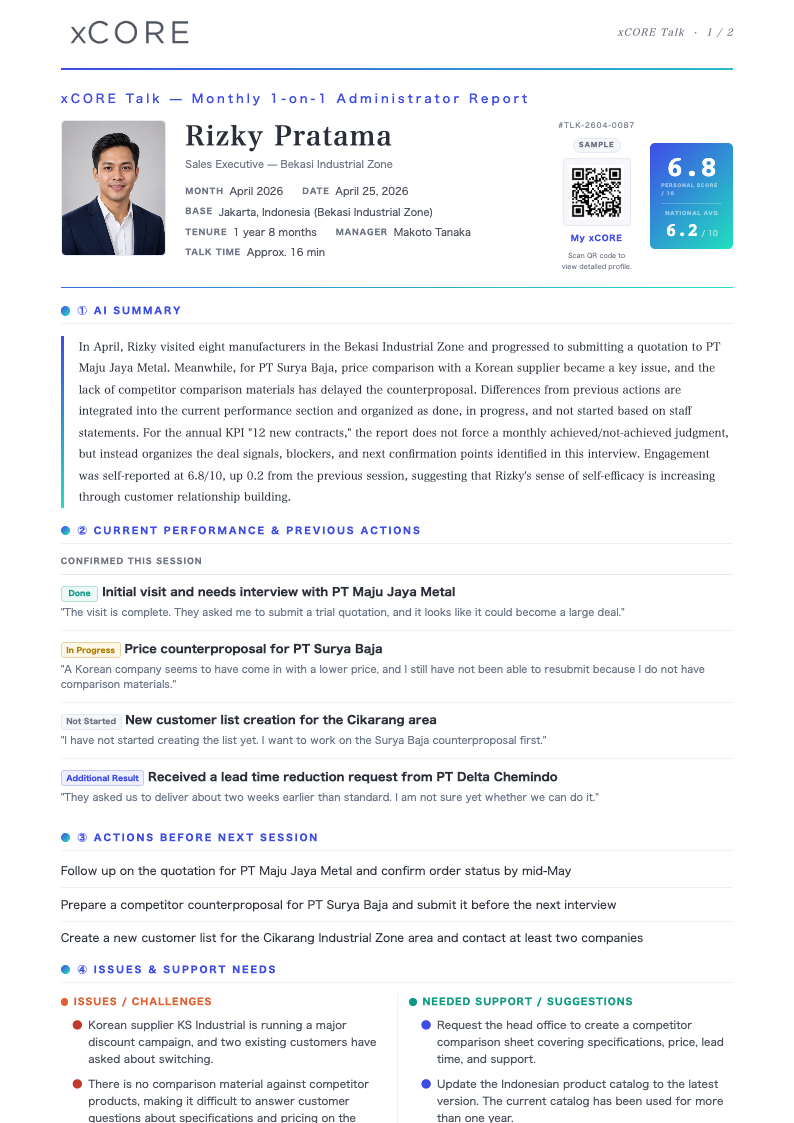
Choose a topic to locate it in the report.
Keep local context visible across teams.
Employee
Reflect and choose the next step.
Local manager
Review the context and offer support.
Cross-site support
Help maintain continuity across teams and locations.
A conversation people can trust.
Employees review and submit their responses. Report sharing follows the configured roles and visibility. AI organizes the context; people decide how to support.
AI organizes the evidence. People make the final decision.
Explore more with xCORE
Frequently asked questions
What can employees talk about?
Conversations can cover recent work, progress, goals, challenges and support needs. The aim is to connect reflection with a useful next action.
How are earlier conversations used?
The ongoing record helps teams revisit previous actions, recognize progress and identify what needs more support.
Who can view the report?
Visibility depends on configured roles and sharing settings. Confirm access for your organization as part of the setup.